Editing the dense quad mesh¤
The dense mesh can be edited with the same strip rule as the coarse mesh, one row of quads at a time: a line is removed, or a polyedge is split open into a new line of quads.
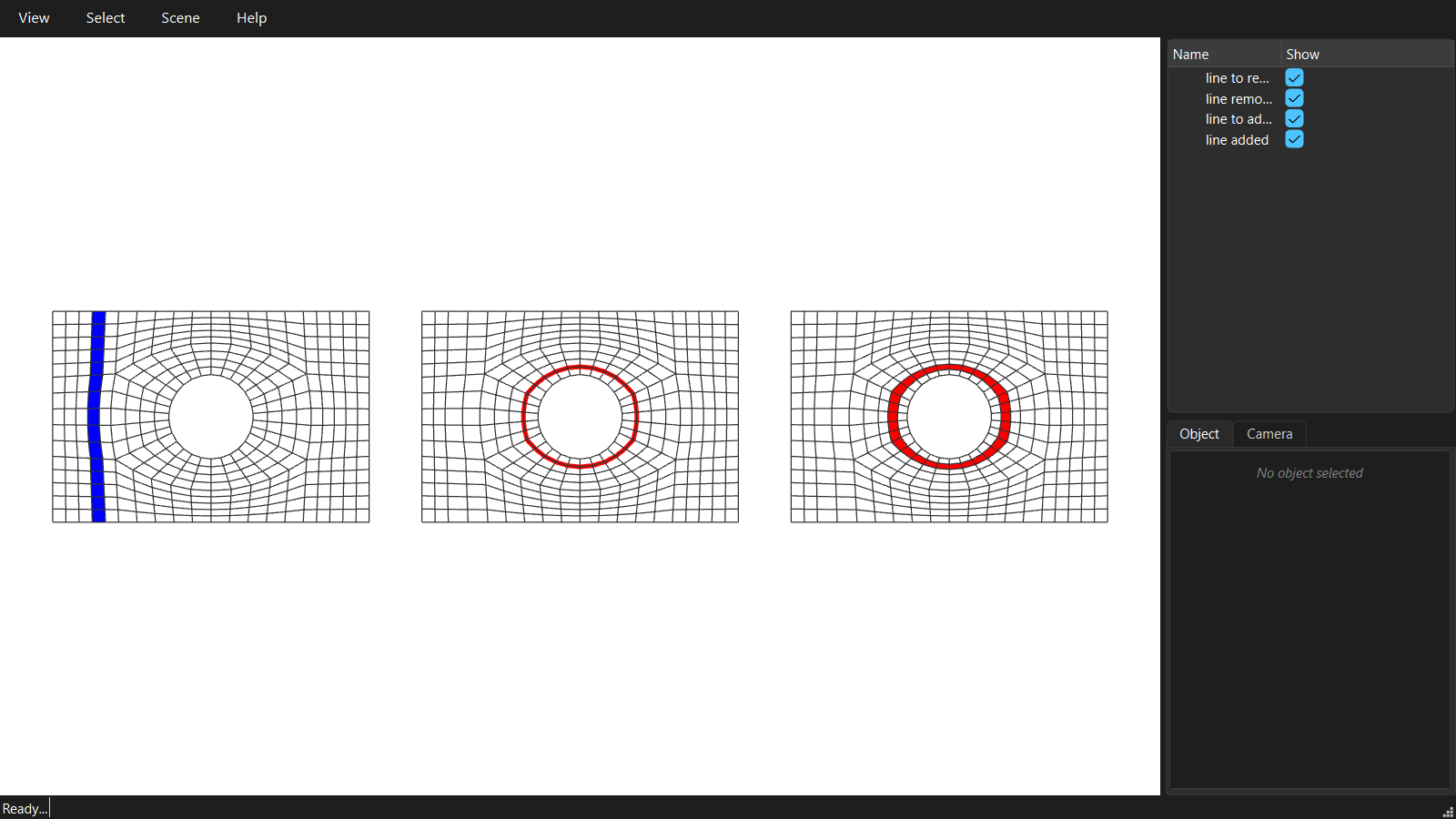
"""07 - Editing the dense quad mesh.

The dense mesh can be edited too, with the same strip rule as the coarse mesh in
03, but now one row of quads at a time:

* remove a line: a whole strip of quads is removed and its two sides are merged,
* add a line: a polyedge is split open into a new strip of quads.

A line has to run the full width of the mesh, from boundary to boundary or all
the way round, or the mesh would no longer be all quads. An edit that cannot be
made is refused, returns ok=False with the reason, and changes nothing.

Note: these edits are lost when the coarse mesh is densified again.
"""
import math

from compas.colors import Color
from compas.geometry import Polyline, Translation, closest_point_in_cloud
from compas_viewer import Viewer
from compas_viewer.config import Config

from compas_singular.algorithms import SkeletonDecomposition
from compas_singular.editing import DenseMeshEditor

# The mesh of 01, a little coarser so the rows are easy to see.
outer = [[-6.0, -4.0, 0.0], [6.0, -4.0, 0.0], [6.0, 4.0, 0.0], [-6.0, 4.0, 0.0]]
hole = [[1.6 * math.cos(2 * math.pi * i / 64), 1.6 * math.sin(2 * math.pi * i / 64), 0.0] for i in range(64)]

decomposition = SkeletonDecomposition.from_boundary(outer, inner_boundaries=[hole], target_length=0.5)
coarse = decomposition.coarse_mesh()
coarse.set_strips_density_target(0.6)
original = coarse.densify()

# The editor changes the mesh it is given, so it gets a copy. It needs the
# walls to keep the boundary vertices on them.
editor = DenseMeshEditor(original.copy(), walls=[outer, hole])

# 1. Remove the line through a horizontal edge: the column of quads it crosses,
#    from the bottom wall to the top wall.
#    An edge is picked by the two vertices closest to two points.
keys = list(editor.mesh.vertices())
points = editor.mesh.vertices_attributes('xyz', keys=keys)
u = keys[closest_point_in_cloud([-4.64, -0.95, 0.0], points)[2]]
v = keys[closest_point_in_cloud([-4.19, -0.96, 0.0], points)[2]]

editor.mesh.collect_strips()
removed_faces = editor.mesh.strip_faces(editor.mesh.edge_strip((u, v)))

# plan_strip_deletion((u, v)) reports what the removal would do, without doing it.
ok, notes = editor.remove_line((u, v))
print('remove line :', ok, 'faces', notes['faces_before'], '->', notes['faces_after'])
after_remove = editor.mesh.copy()

# 2. Add a line along the polyedge through an edge of the second ring of vertices
#    around the hole. That polyedge closes on itself, so the new strip is a ring.
#    Only the new vertices move: each pair opens a third of the way towards its
#    neighbours, and a pair on a wall stays on the wall.
keys = list(editor.mesh.vertices())
points = editor.mesh.vertices_attributes('xyz', keys=keys)
u = keys[closest_point_in_cloud([2.14, 0.18, 0.0], points)[2]]
v = keys[closest_point_in_cloud([2.1, 0.52, 0.0], points)[2]]

pkey, polyedge = editor.polyedge_through((u, v))
added_along = Polyline(editor.mesh.vertices_attributes('xyz', keys=polyedge))

ok, notes = editor.add_line((u, v))
print('add line    :', ok, 'faces', notes['faces_before'], '->', notes['faces_after'])
added_faces = [f for f in editor.mesh.faces() if f not in after_remove.face]

# Visualisation: line to remove | line removed, line to add | line added
config = Config()
config.renderer.show_grid = False
viewer = Viewer(config=config)
viewer.renderer.view = 'top'

colors = {f: Color.blue() if f in removed_faces else Color.white() for f in original.faces()}
viewer.scene.add(original, facecolor=colors, show_points=False, name='line to remove')

move = Translation.from_vector([14, 0, 0])
viewer.scene.add(after_remove.transformed(move), facecolor=Color.white(), show_points=False, name='line removed')
viewer.scene.add(added_along.transformed(move), linecolor=Color.red(), linewidth=4, name='line to add along')

move = Translation.from_vector([28, 0, 0])
colors = {f: Color.red() if f in added_faces else Color.white() for f in editor.mesh.faces()}
viewer.scene.add(editor.mesh.transformed(move), facecolor=colors, show_points=False, name='line added')

viewer.renderer.camera.target.set(14, 0, 0)
viewer.renderer.camera.distance = 22
viewer.show()