The basic skeleton workflow¤
The skeleton route from boundary to dense quad mesh: the medial axis of the domain cuts it into a few large quad patches, and each patch is filled with a grid of quads.
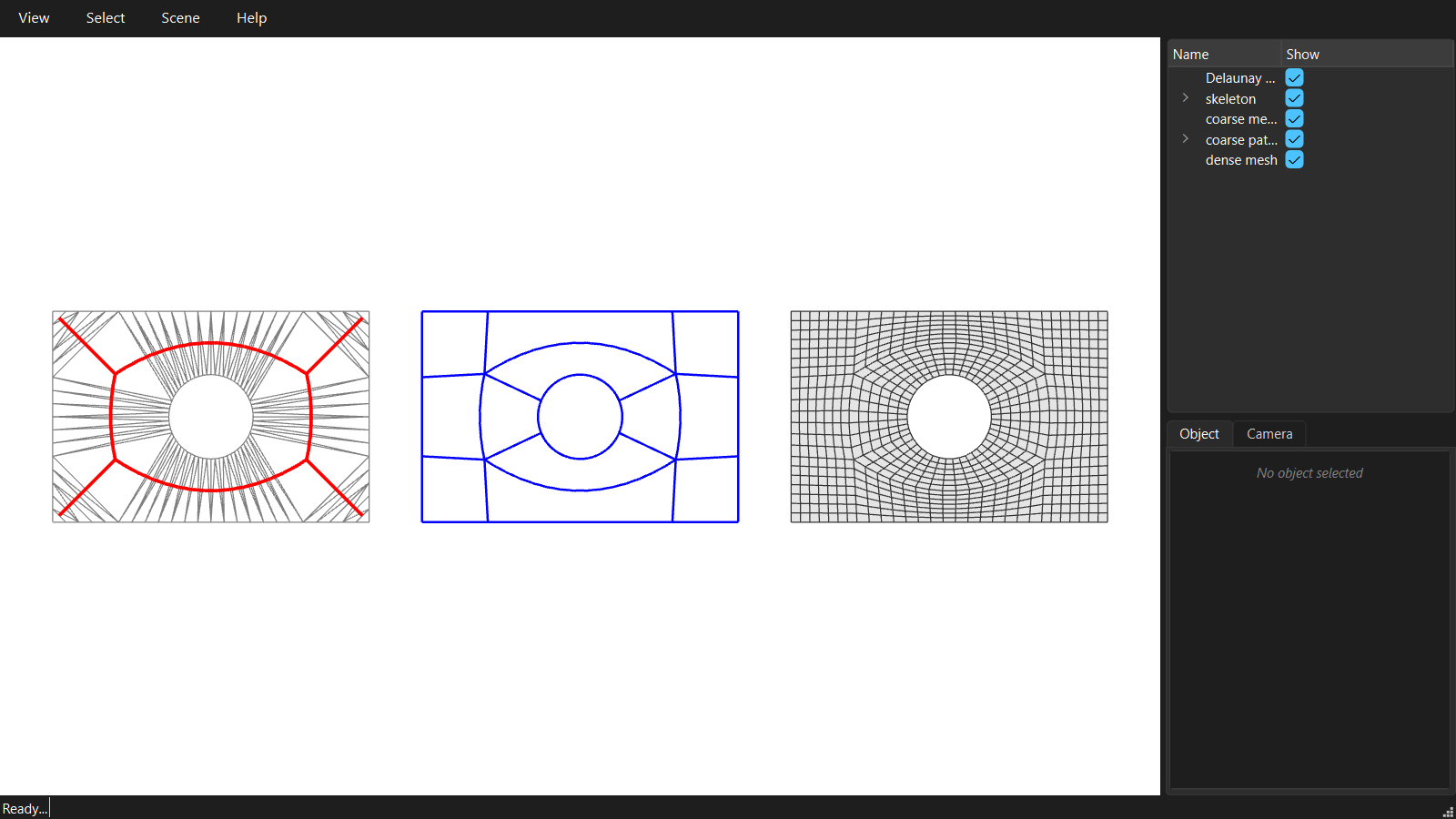
"""01 - The basic skeleton workflow.

Boundary -> skeleton -> coarse quad layout -> densities -> dense quad mesh.

The skeleton (medial axis) of the domain is read off a Delaunay triangulation of
its boundary. Its branches cut the domain into a few large quad patches: the
COARSE mesh. Each patch is then subdivided into a grid of quads: the DENSE mesh.
"""
import math

from compas.colors import Color
from compas.geometry import Polyline, Translation
from compas_viewer import Viewer
from compas_viewer.config import Config

from compas_singular.algorithms import SkeletonDecomposition

# The domain: a rectangle with a circular hole.
# A curved boundary is given as a sampled point list: these points ARE the hole.
outer = [[-6.0, -4.0, 0.0], [6.0, -4.0, 0.0], [6.0, 4.0, 0.0], [-6.0, 4.0, 0.0]]
hole = [[1.6 * math.cos(2 * math.pi * i / 64), 1.6 * math.sin(2 * math.pi * i / 64), 0.0] for i in range(64)]

# The skeleton. The boundary is resampled at target_length before it is
# triangulated, so this sets how fine the triangulation is, not the quad size.
decomposition = SkeletonDecomposition.from_boundary(outer, inner_boundaries=[hole], target_length=0.5)
branches = decomposition.branches()

# The coarse quad mesh: the skeleton branches cut the domain into quad patches.
coarse = decomposition.coarse_mesh()
print('coarse mesh :', coarse.number_of_faces(), 'patches')

# The densities: every strip of patches gets the number of subdivisions closest
# to a target edge length. A strip is shared by neighbouring patches, so the
# result is always a conforming mesh.
coarse.set_strips_density_target(0.4)

# The dense quad mesh: every patch is filled with a grid of quads.
# coarse.quad_mesh() does the same. coarse.densification() is the original method,
# kept for compatibility: it has no patterns (05).
dense = coarse.densify()
print('dense mesh  :', dense.number_of_faces(), 'quads')

# Visualisation: triangulation + skeleton | coarse mesh | dense mesh
config = Config()
config.renderer.show_grid = False
viewer = Viewer(config=config)
viewer.renderer.view = 'top'

viewer.scene.add(decomposition, show_points=False, facecolor=Color.white(), edgecolor=Color.grey(), name='Delaunay triangulation')
group = viewer.scene.add_group(name='skeleton')
for branch in branches:
    group.add(Polyline([[x, y, 0.01] for x, y, z in branch]), linecolor=Color.red(), linewidth=3)

# The coarse patch edges keep the curves they were traced along.
move = Translation.from_vector([14, 0, 0])
viewer.scene.add(coarse.transformed(move), show_faces=False, show_lines=False, name='coarse mesh')
group = viewer.scene.add_group(name='coarse patch edges')
for polyline in decomposition.polylines:
    group.add(Polyline(polyline).transformed(move), linecolor=Color.blue(), linewidth=2)

viewer.scene.add(dense.transformed(Translation.from_vector([28, 0, 0])), show_points=False, name='dense mesh')

viewer.renderer.camera.target.set(14, 0, 0)
viewer.renderer.camera.distance = 22
viewer.show()