Smoothing the quad mesh¤
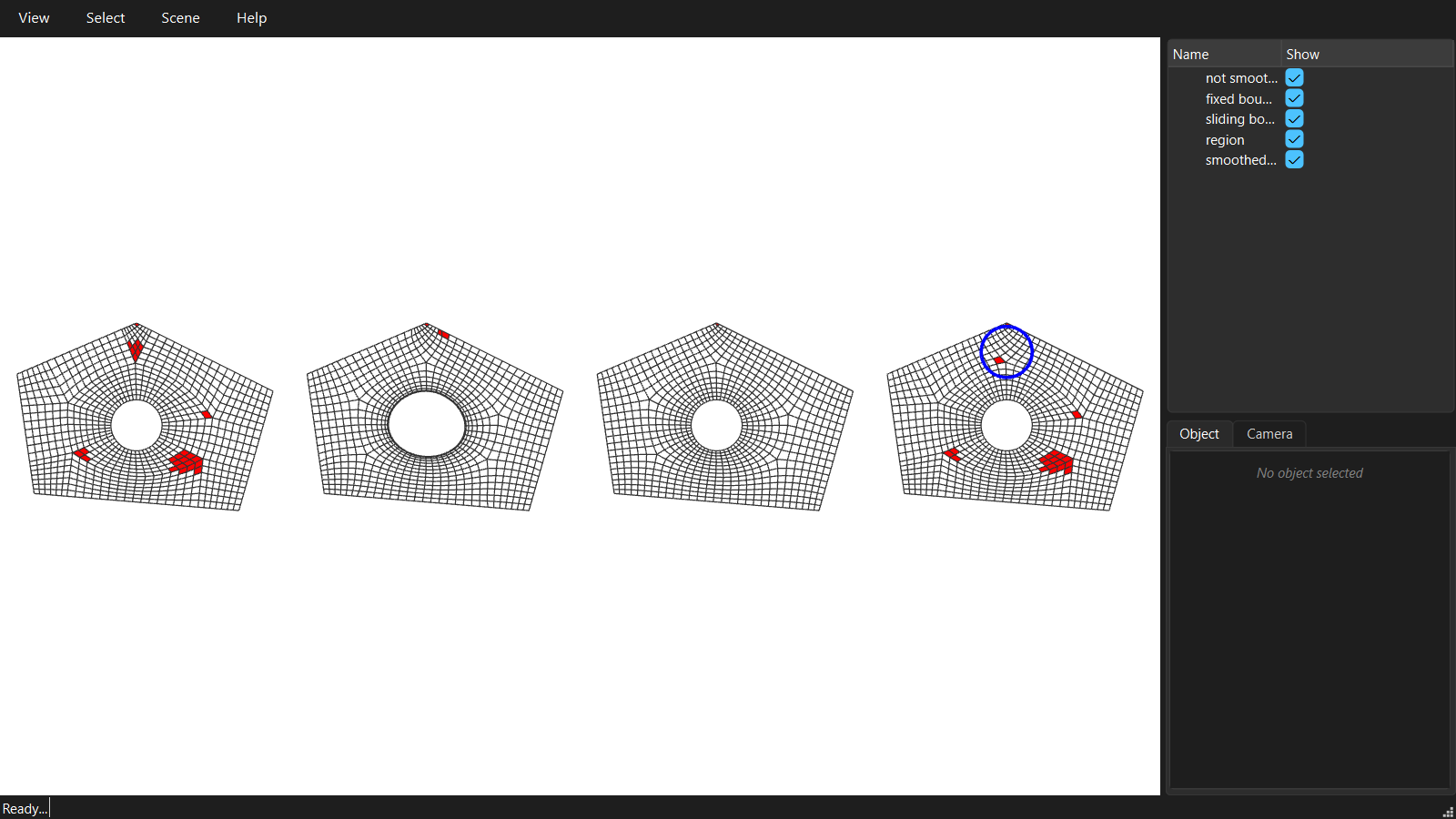
A dense mesh straight from densify() is made of patches that were each filled on their own, so the quads kink where patches meet. Smoothing moves the vertices to even out the quads, without changing the topology.
"""06 - Smoothing the quad mesh.

A dense mesh straight from densify() is made of patches that were each
filled on their own, so the quads kink where patches meet. Smoothing moves the
vertices to even out the quads, without changing the topology.

Three ways, on the same mesh:

* the whole mesh, with the boundary FIXED,
* the whole mesh, with the boundary vertices SLIDING along the boundary,
* only a region of the mesh.

The quality is measured by the angles of the quads: 90 degrees is a perfect quad.
"""
import math

from compas.colors import Color
from compas.geometry import Polyline, Translation, distance_point_point
from compas_viewer import Viewer
from compas_viewer.config import Config

from compas_singular.algorithms import SkeletonDecomposition
from compas_singular.datastructures.mesh.smoothing import boundary_constrained_smoothing, region_smoothing
from compas_singular.framefield.quality import face_angles, mesh_quality

# An irregular domain with a hole, densified as in 01.
outer = [[0.0, 0.0, 0.0], [12.0, -1.0, 0.0], [14.0, 6.0, 0.0], [6.0, 10.0, 0.0], [-1.0, 7.0, 0.0]]
hole = [[6.0 + 1.5 * math.cos(2 * math.pi * i / 64), 4.0 + 1.5 * math.sin(2 * math.pi * i / 64), 0.0] for i in range(64)]

decomposition = SkeletonDecomposition.from_boundary(outer, inner_boundaries=[hole], target_length=0.5)
coarse = decomposition.coarse_mesh()
coarse.set_strips_density_target(0.4)
dense = coarse.densify()

# 1. Fixed boundary: compas' own centroid smoothing. The boundary cannot move,
#    so the quads next to it cannot follow the rest.
fixed = dense.copy()
fixed.smooth_centroid(fixed=list(fixed.vertices_on_boundary()), kmax=50)

# 2. Sliding boundary: the boundary vertices are pulled back onto the boundary
#    curves after every step, so they slide along them. Corners stay put.
sliding = dense.copy()
boundary_constrained_smoothing(sliding, curves=[Polyline(outer + outer[:1]), Polyline(hole + hole[:1])], kmax=50)

# 3. A region: only the vertices within 1.5 of a point move. The smoothing fades
#    out over 3 rings of vertices around the region, so it blends in.
centre = [6.0, 8.3, 0.0]
local = dense.copy()
region = [v for v in local.vertices() if distance_point_point(local.vertex_coordinates(v), centre) < 1.5]
region_smoothing(local, region, kmax=50)

# Visualisation: faces with an angle under 60 or over 120 degrees are red.
config = Config()
config.renderer.show_grid = False
viewer = Viewer(config=config)
viewer.renderer.view = 'top'

for i, (name, mesh) in enumerate([('not smoothed', dense), ('fixed boundary', fixed), ('sliding boundary', sliding), ('region', local)]):
    bad = [f for f in mesh.faces() if min(face_angles(mesh.face_coordinates(f))) < 60 or max(face_angles(mesh.face_coordinates(f))) > 120]
    print('{:<16} : min angle {:.1f}, {} faces under 60 or over 120 degrees'.format(name, mesh_quality(mesh)['min_angle'], len(bad)))
    colors = {f: Color.red() if f in bad else Color.white() for f in mesh.faces()}
    viewer.scene.add(mesh.transformed(Translation.from_vector([17 * i, 0, 0])), facecolor=colors, show_points=False, name=name)

circle = Polyline([[centre[0] + 1.5 * math.cos(2 * math.pi * i / 32), centre[1] + 1.5 * math.sin(2 * math.pi * i / 32), 0.01] for i in range(33)])
viewer.scene.add(circle.transformed(Translation.from_vector([51, 0, 0])), linecolor=Color.blue(), linewidth=3, name='smoothed region')

viewer.renderer.camera.target.set(32, 4.5, 0)
viewer.renderer.camera.distance = 34
viewer.show()